SaaS Ad Creatives at Scale: 100+ Variations
How to produce 100+ SaaS ad creatives with a scalable design system. Static, motion, and UI walkthrough formats for multiple audience segments.
SaaS products are invisible. You cannot photograph software. You cannot hold a dashboard in your hand. You cannot show a customer unboxing an API integration. This makes SaaS advertising fundamentally harder than physical product advertising — you are selling something that exists only on a screen, and you need to make it compelling enough to stop someone mid-scroll.
Most SaaS companies respond to this challenge with one of two approaches: they create 3-5 generic ads with stock photography and hope the targeting does the work, or they invest in a single high-production video that serves as the sole creative asset for months. Neither approach scales.
Flipsystem, a real estate CRM platform, took a third approach: build a scalable design system and produce 100+ static and motion ad creatives across multiple audience segments. The system generates 5-10 variations per segment every 3-5 weeks, sustaining campaign performance through continuous creative refresh. Here is how it works and why SaaS companies need this approach.
Why SaaS Ads Are Different
Before getting into the production system, it is important to understand why SaaS advertising has unique challenges that consumer product ads do not.
The Intangibility Problem
When Nike runs an ad, they show shoes. When Apple runs an ad, they show a phone. The product is visual, tangible, and immediately understood.
When a SaaS company runs an ad, they need to communicate:
- What the software does (feature comprehension)
- Why it matters (pain point resonance)
- How it feels to use (experience simulation)
- What changes after adoption (outcome visualization)
All of this must happen in a static image or a 15-second video. The creative has to do work that physical products get for free.
The Multi-Persona Problem
Most SaaS products serve multiple user types. Flipsystem, for example, is a real estate CRM — but the value proposition is different for:
- Solo agents who need lead management and follow-up automation
- Team leaders who need pipeline visibility and performance tracking
- Brokerage owners who need reporting, compliance, and agent onboarding
- Investors who need deal tracking and portfolio management
One ad creative cannot speak to all four audiences effectively. Each persona has different pain points, different language, and different decision criteria. This is why SaaS campaigns need 50-100+ variations — not because of ad fatigue, but because of audience diversity.
The Feature Complexity Problem
SaaS products often have 10-20+ features, each of which could be the primary selling point for a different audience segment. Flipsystem includes CRM, lead scoring, automated follow-up, pipeline management, reporting, and integrations — each deserving its own creative angle.
Testing which features resonate with which audiences requires a volume of creative that most companies do not produce. The result: they default to the broadest possible message (“Grow your business with our CRM”) and miss the specific pain points that drive conversions.
The Flipsystem Case: 100+ Creatives, Scalable System
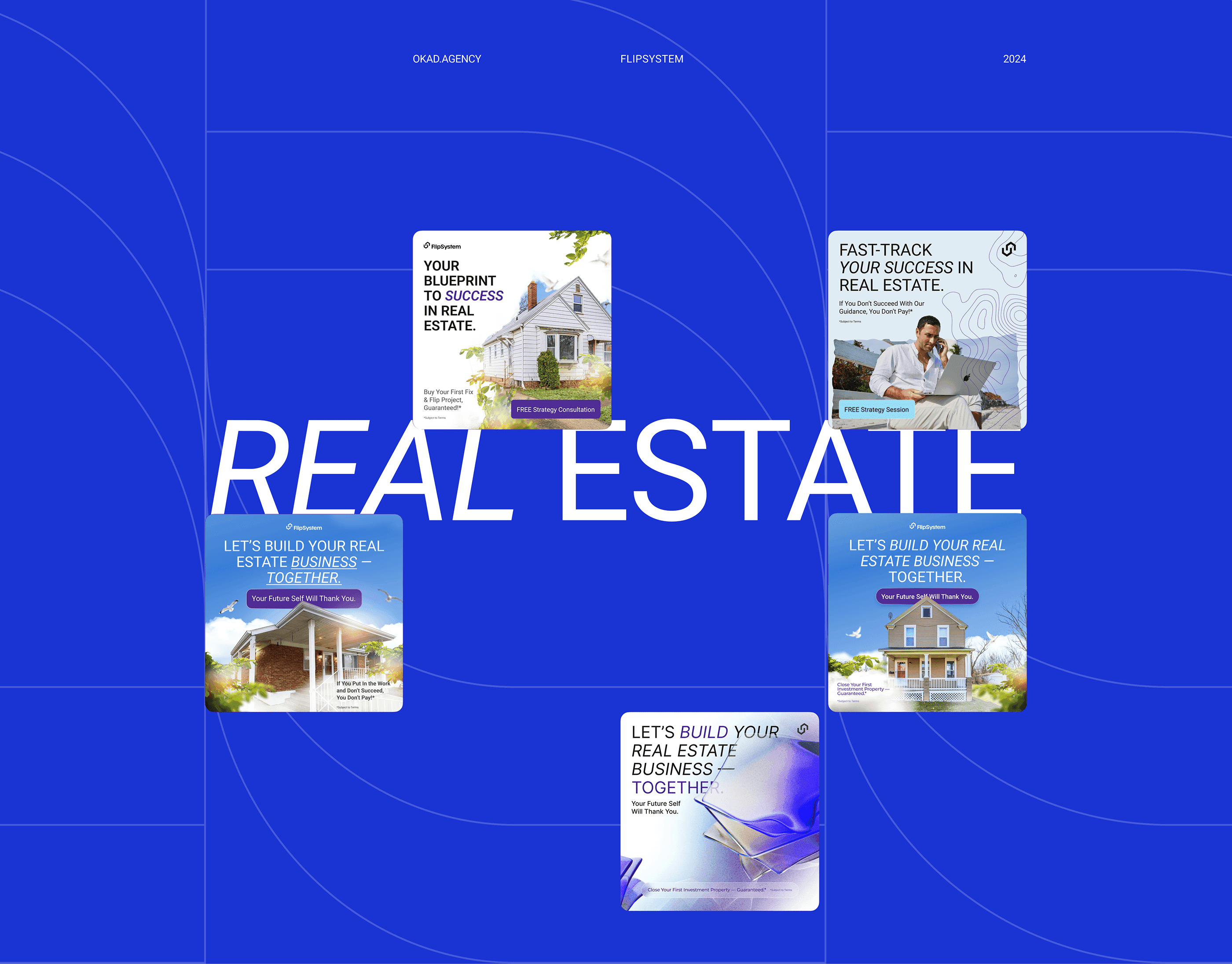
Flipsystem needed a creative engine that could sustain paid campaigns across Meta and Google over months. The requirements:
- 100+ total creatives across all formats and segments
- Static and motion formats to test performance across placements
- 5-10 variations per audience segment to enable proper testing
- 3-5 week production cycles for ongoing creative refresh
- Animated UI walkthroughs to explain complex features
The Design System Approach
The key insight: do not design 100 ads from scratch. Design a system that produces 100 ads.
The design system includes:
Base templates — 4-5 master layouts for each format (static, animated, video). Each template defines the grid, typography hierarchy, color zones, and component placement.
Modular components — Interchangeable elements that slot into the templates:
- Headlines (10-15 variations per segment)
- UI screenshots (different features, different screens)
- Social proof elements (testimonials, metrics, logos)
- CTAs (different urgency levels and action words)
- Background treatments (color, gradient, image-based)
Segment profiles — Each audience segment has a defined set of pain points, language patterns, and visual preferences. The agent persona emphasizes individual productivity. The brokerage persona emphasizes team management and ROI.
With this system, producing a new variation takes minutes, not hours. Swap the headline, change the UI screenshot, update the CTA — and you have a new ad that is on-brand, on-template, and ready for testing.
Static Creatives: The Volume Play
Static ads serve two purposes in SaaS campaigns:
-
High-volume testing. You can produce and launch 20 static variations in the time it takes to produce 2 motion ads. This makes static the ideal format for testing hooks, angles, and messaging.
-
Retargeting efficiency. Users who have already visited the website or engaged with video ads respond well to static retargeting ads that reinforce a single message. A static ad with “37% faster lead response time” is effective retargeting creative because it is specific and skimmable.
For Flipsystem, the static creative matrix looked like this:
| Audience Segment | Pain Points Tested | Variations |
|---|---|---|
| Solo agents | Lead management, follow-up speed, deal tracking | 8-12 |
| Team leaders | Pipeline visibility, team performance, forecasting | 8-12 |
| Brokerage owners | Reporting, compliance, agent onboarding | 8-12 |
| Investors | Deal tracking, portfolio management, ROI reporting | 5-8 |
Each variation tested a different combination of headline, UI screenshot, and CTA — all produced from the same design system templates.
Motion Creatives: The Explanation Play
Where static ads test messaging, motion ads explain value. Animated creatives are essential for SaaS because they can show the product in action — something static images cannot do.
Flipsystem’s motion formats included:
UI walkthroughs — Screen recordings of the actual product, animated to highlight specific features. A 15-second walkthrough of the lead scoring dashboard communicates more than 10 static ads explaining the same feature.
The production process:
- Record screen captures of key product workflows
- Annotate with animated callouts, highlights, and transitions
- Add voice-over or text overlay explaining each step
- Produce at multiple aspect ratios (1:1, 4:5, 9:16, 16:9)
Feature highlight animations — Motion graphics that illustrate abstract benefits. “Automate your follow-up” is abstract — an animation showing a lead entering the system, triggering an automated sequence, and converting to a meeting is concrete.
Comparison animations — Before/after sequences showing the problem (manual spreadsheets, missed follow-ups, lost deals) versus the solution (automated pipeline, instant alerts, closed deals). These perform well at the top of funnel where awareness is the objective.
The Batch Production Cycle
Flipsystem’s creative production follows a repeating cycle:
Week 1: Strategy and Brief
- Review performance data from the previous batch
- Identify winning and losing angles
- Write briefs for the next batch of 5-10 variations per segment
- Prioritize formats (more static for testing, more motion for proven angles)
Week 2-3: Production
- Design static variations from the template system
- Produce motion creatives (UI walkthroughs, feature animations)
- Internal review and revisions
Week 4-5: Launch and Optimize
- Launch new creatives into existing campaign structures
- Monitor early performance signals (CTR, hook rate, CPC)
- Pause underperformers and reallocate budget to winners
- Document learnings for the next batch
This 3-5 week cycle ensures the campaign always has fresh creative. By the time one batch fatigues, the next is ready to launch.
Making the Invisible Visible: Four Techniques
The core challenge of SaaS advertising — making an intangible product compelling in a visual medium — requires specific techniques.
Technique 1: Show the Screen
The most effective SaaS ad creative shows the actual product. This sounds obvious, but many SaaS companies avoid product screenshots in ads because they worry the UI is not “exciting” enough. The opposite is true — real product visuals build credibility and help prospects self-qualify.
Effective screen-based ads:
- Highlight one specific screen or feature, not the entire product
- Use annotations or animations to draw attention to the key element
- Show realistic data in the screenshots (not empty states or lorem ipsum)
- Match the screen content to the audience segment’s use case
Technique 2: Animate the Workflow
Static screenshots show what the product looks like. Animated workflows show what it feels like to use. A 10-15 second animation that walks through adding a lead, triggering automation, and seeing the follow-up sequence complete is more persuasive than any amount of feature description.
The production approach:
- Identify the 3-4 workflows most relevant to each audience segment
- Record screen captures with realistic data
- Speed up mundane steps, slow down impressive moments
- Add visual cues (cursor highlighting, zoom effects, callout annotations)
Technique 3: Quantify the Outcome
Numbers cut through abstraction. “Better lead management” is vague. “37% faster lead response time” is specific and testable. “Improved team visibility” is generic. “Pipeline accuracy up 52% in 30 days” is compelling.
Flipsystem’s most effective static ads led with specific metrics — either from case studies, product data, or industry benchmarks. The pattern: [specific number] + [specific outcome] + [specific timeframe].
Technique 4: Show the Before/After
The before/after framework works for SaaS because the “before” state is usually messy and recognizable. A spreadsheet with 47 tabs and color-coded columns. An inbox with 200 unread lead notifications. A whiteboard covered in sticky notes.
The “after” state is the product: clean dashboard, organized pipeline, automated workflows. The contrast does the selling — the viewer sees their current pain in the “before” and the solution in the “after” without needing to read a word of copy.
Scaling SaaS Creative: What to Build First
If you are a SaaS company running paid campaigns with fewer than 20 ad variations, here is the sequence for building a scalable creative system.
Phase 1: Template Foundation (Week 1-2)
Build 3-4 base templates across static and motion formats. Establish your visual system: typography, color, component library, grid structure. This is the infrastructure that makes everything else efficient.
Phase 2: First Batch (Week 2-4)
Produce 15-20 variations across your top 2-3 audience segments. Include both static and motion formats. Test different feature highlights, pain points, and CTAs.
Phase 3: Test and Learn (Week 4-6)
Launch, measure, and document. Which segments respond to which angles? Which features drive clicks? Which formats get conversions? This data feeds Phase 4.
Phase 4: Scaling Production (Week 6+)
With templates built and data collected, shift to a repeating production cycle. Produce 5-10 new variations per segment every 3-5 weeks. Double down on winning angles. Test new hypotheses. Retire fatigued creatives.
By month 3, you should have 50-100+ creatives in rotation with a clear understanding of what works for each audience segment.
The Bottom Line
SaaS advertising at scale is a design systems problem, not a creative inspiration problem. The companies that produce 100+ ad variations are not more creative — they have better systems. A modular template approach, batch production cycles, and a mix of static and motion formats creates a sustainable creative engine.
Flipsystem’s approach — 100+ creatives, scalable design system, 5-10 variations per segment, 3-5 week production cycles — is not exceptional. It is what effective SaaS advertising looks like. If your campaign is running on fewer than 20 variations, you are not just under-producing — you are under-testing, under-learning, and under-performing.
Build the system. The creative follows.
Questions people ask
How many ad creatives does a SaaS company need?
At minimum, 20-30 active variations across 3-5 audience segments. For serious scale, 50-100+ variations tested monthly. Flipsystem's campaign used 100+ static and motion creatives produced in batches of 5-10 per audience segment every 3-5 weeks. The algorithm needs fresh creative to find new audiences — running 5 ads is not testing, it is hoping.
What is a scalable design system for ads?
A modular template system where visual elements (backgrounds, UI screenshots, icons, text blocks) can be swapped independently to generate variations without redesigning from scratch. For Flipsystem, this meant creating base templates for each format (static, animated, video) where headlines, feature highlights, social proof elements, and CTAs could be mixed and matched to produce 5-10 variations per segment efficiently.
Do animated ads outperform static ads for SaaS?
They serve different purposes. Static ads are cheaper to produce and work well for retargeting and simple value propositions. Animated/motion ads are better for explaining complex features, showing UI workflows, and communicating intangible benefits. The best SaaS campaigns use both — static for high-volume testing and motion for high-impact storytelling. Flipsystem's campaign included both formats.
How do you make an invisible product visible in ads?
Four approaches: UI screen recordings showing the product in action, animated walkthrough sequences highlighting key workflows, before/after comparisons showing the problem vs. the solution, and outcome metrics that quantify the benefit. SaaS products are intangible — the ad must make the abstract concrete. Show the dashboard, the notification, the report, the result.
What is the typical production timeline for SaaS ad creative batches?
For Flipsystem, each batch of 5-10 variations per audience segment took 3-5 weeks from brief to delivery. This includes strategy, design, animation, review, and revisions. With a scalable design system in place, subsequent batches are faster because the templates and components already exist. The first batch establishes the system; batches 2+ are production runs.